

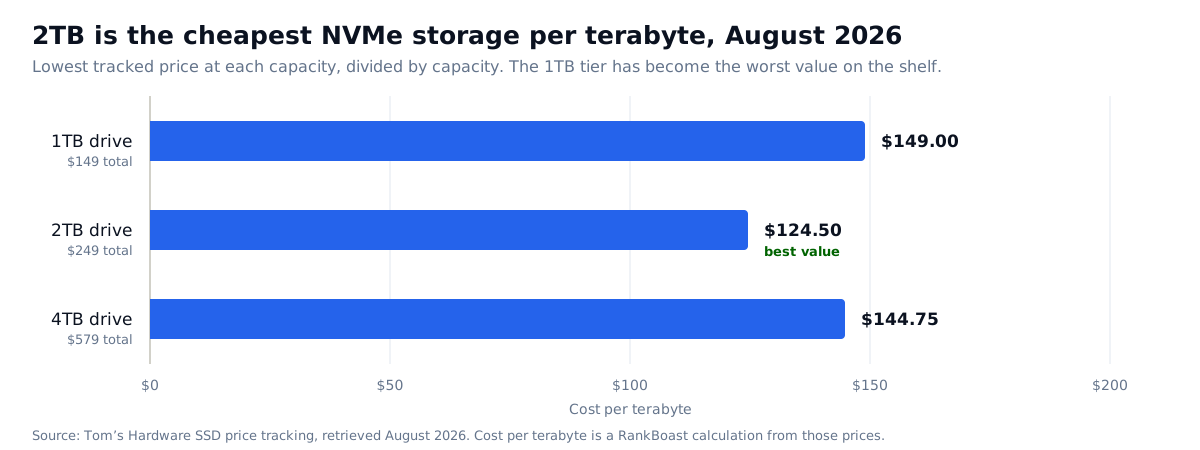
In short: buy 2TB. When you choose an SSD in 2026, 2TB is both the capacity most people need and the cheapest storage per terabyte at $124.50/TB, against $149 at 1TB and $144.75 at 4TB. NAND flash spot prices rose roughly fivefold between August 2025 and January 2026 as data-center buyers absorbed supply, and the 1TB tier absorbed the damage worst.
The old rule for how to choose an SSD was that bigger drives cost less per terabyte, so you bought the largest you could afford. That rule has broken in an unusually useful way, and the exception is worth understanding before you spend.
What happened to SSD prices
Tom’s Hardware, tracking lowest available M.2 prices, attributes the surge to NAND flash pricing under “severe market pressures, fuelled by the rapid growth in AI,” with data-center operators “buying everything they can no matter the cost.” Spot NAND was roughly flat through most of 2025 before rising about fivefold by January 2026.
This is the same shortage driving memory and graphics card prices — see how much RAM you actually need and our GPU buying guide. Storage, memory and graphics are now one story, not three.
How to choose an SSD by cost per terabyte
Look at one drive family across capacities and the distortion becomes obvious.
| Capacity | Price | Cost per TB |
|---|---|---|
| 1TB | $324 | $324.00 |
| 2TB | $345 | $172.50 |
| 4TB | $669 | $167.25 |
Within the same family, stepping from 1TB to 2TB costs $21 more for double the capacity. Per terabyte, the 1TB drive costs 1.88× the 2TB. Buying the smaller drive to save money saves $21 and halves your storage.
Across brands the pattern holds, using the cheapest drive at each capacity:
| Capacity | Drive | Price | Cost per TB |
|---|---|---|---|
| 1TB | Silicon Power UD90 | $149 | $149.00 |
| 2TB | Silicon Power UD90 | $249 | $124.50 |
| 4TB | Samsung 990 Evo Plus | $579 | $144.75 |
Prices from Tom’s Hardware SSD price tracking, retrieved August 2026. Cost per terabyte is our calculation. Prices move weekly and stock is limited.
How to choose an SSD capacity for your workload
| Use | Capacity | Notes |
|---|---|---|
| Office work, browsing, documents | 1TB | The only case where 1TB makes sense, and only if the price gap to 2TB is real rather than $21. |
| Gaming | 2TB | Modern installs are large. 2TB is the value tier and the practical tier at once. |
| Photo editing, 1080p video | 2TB, plus external backup | Working drive fast, archive elsewhere. Never one copy. |
| 4K video, large libraries | 4TB+ | Per-TB cost rises again above 2TB, but the work will not fit otherwise. |
| Local AI models | 2TB minimum | Model weights are large. Check VRAM first — see our local LLM guide. |
Which specifications matter when you choose an SSD
Sequential speed is the most over-marketed number in storage. A drive advertising 7,000MB/s and one advertising 5,000MB/s feel nearly identical in normal desktop use, because everyday work is dominated by small random reads and by how the drive behaves once its fast cache is full, not by peak sequential throughput.
Sustained write behavior is what you actually feel. Most consumer drives use a fast write cache and slow down considerably once it is exhausted. That is what makes a large file copy crawl at the end. Manufacturers rarely publish it prominently.
Endurance is usually a non-issue for consumers. Endurance is rated in terabytes written, and typical desktop use will not approach it within the drive’s useful life. It matters for sustained recording or database work.
DRAM cache and interface generation matter more for consistency than headline speed. A PCIe 4.0 drive with DRAM often behaves better in practice than a cacheless PCIe 5.0 drive.
We publish no benchmark figures here. RankBoast has not tested these drives, and our review methodology forbids inventing measurements. For sustained-write and random-IO results, read a lab that runs them.
How to choose an SSD: check these before buying
- Check the price of the next capacity up. In this market the step is often trivial. This single check is the article.
- Confirm the slot and interface your motherboard or laptop provides, and whether the M.2 slot is full length.
- Check heatsink clearance if the slot sits under a graphics card.
- Verify it is NVMe, not SATA M.2. They share a shape and are not interchangeable.
- Budget for backup, not just capacity. One drive is not a backup, whatever its endurance rating.
Common mistakes
Buying 1TB to save money. Currently the worst value tier on the shelf, sometimes by a margin of $21.
Chasing sequential speed. Pay for capacity and consistency; ignore the biggest number on the box.
Assuming bigger is always cheaper per TB. True below 2TB, false above it right now.
Filling a drive to the brim. SSDs slow as they approach full. Leave roughly 10–15% free, which is another argument for the larger tier.
Treating a second internal drive as a backup. A backup is on different hardware, ideally in a different place.
Who should choose what
- Almost everyone: 2TB NVMe. Best cost per terabyte and enough capacity to stop thinking about it.
- Light use, tight budget: 1TB, but only after confirming the gap to 2TB is genuinely meaningful.
- Video, large libraries, archives: 4TB, accepting a worse per-TB rate because the alternative is not having room.
- Upgrading an older machine: confirm the interface first. A SATA-only laptop cannot use an NVMe drive.
- Not urgent: wait. Storage is among the components most likely to fall when NAND supply recovers.
Verdict
When you choose an SSD in this market: 2TB, and check the 1TB price against it before you commit — that comparison is where the money is currently being lost. The wider lesson from this market is that per-unit cost has stopped being predictable, so the habit worth building is dividing price by capacity yourself. It takes ten seconds and, in storage, memory and graphics alike, it is currently the most informative number available.
What we would need to test to say more
This is a framework for how to choose an SSD, not a performance review. Ranking drives on speed would require identical test systems, sustained write tests past cache exhaustion, random-IO measurement at realistic queue depths and thermal logging under load. We have not done that. We have verified current prices against a continuously updated source and done the per-terabyte arithmetic, which is shown above.
Sources and methodology
Prices are from Tom’s Hardware’s SSD price tracking, retrieved August 2026. NAND spot-price context is from the same source. Cost-per-terabyte figures and the chart are RankBoast calculations from those published prices, with inputs shown in the tables. RankBoast has not tested these drives and received no samples. Research and drafting were AI-assisted, with each price traced to the linked source. Storage pricing is volatile — verify before buying. Errors are handled under our corrections policy.
Source links
Join the discussion
Add useful context, ask a focused question or share relevant experience. Comments are moderated to protect readers from spam and promotional links.

Leave a thoughtful comment