

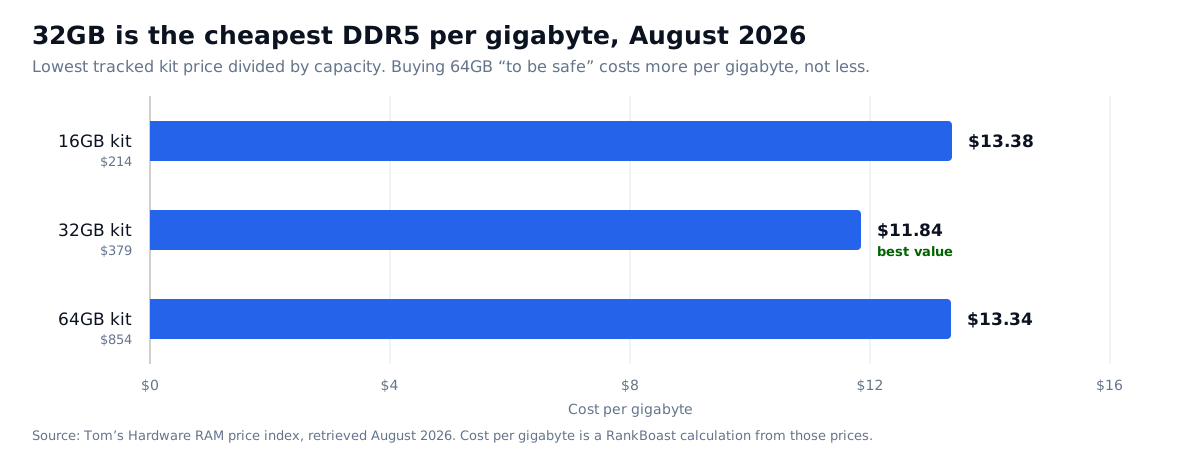
In short: 32GB is the right answer for almost everyone in 2026, and it is also the cheapest DDR5 you can buy per gigabyte — $11.84/GB against $13.38 at 16GB and $13.34 at 64GB. How much RAM do I need has become a budget question as much as a technical one: a global DRAM shortage has pushed a 32GB DDR5 kit from roughly $150 in October 2025 to about $379 today.
The usual way to answer this question is to list workloads and match capacities. That still matters, but it is no longer the whole answer, because memory has stopped behaving like a commodity. Tom’s Hardware, which tracks the lowest available kit prices continuously, reports that DDR5 prices “have exploded over the last trimester” on enterprise and AI demand, with stock so tight that good deals sell out “within seconds.”
That means the honest answer to how much RAM do I need in 2026 includes a second question: what does the next tier up actually cost you, and is it worth it right now?
What happened to memory prices
The scale of the move is worth stating plainly, because a lot of advice still assumes 2024 prices.
| Kit | October 2025 | August 2026 | Direction |
|---|---|---|---|
| 32GB DDR5 | $100–$200 | $379–$396 | Roughly doubled or worse |
| 32GB DDR4 | $60–$90 | $179 | Doubled to tripled |
| 16GB DDR5 | — | $214–$239 | — |
| 64GB DDR5 | — | $854 | — |
Prices from Tom’s Hardware’s RAM price index, retrieved August 2026. Availability is limited and prices move weekly.
The cause is not gaming demand. AI and enterprise buyers are consuming DRAM production faster than it is being made, and consumer kits are competing for what is left. This is the same shortage that has pushed graphics cards well above MSRP — see our guide to choosing a graphics card without overpaying — except memory has moved further, because memory is the bottleneck rather than a component affected by it.
How much RAM do I need for value, not just capacity
Divide price by capacity and something useful appears. A 16GB kit costs $13.38 per gigabyte. A 64GB kit costs $13.34. The 32GB kit sits at $11.84 — about 11% cheaper per gigabyte than either neighbour.
This inverts the normal rule that buying bigger is cheaper per unit. Right now the 32GB tier is where supply and demand happen to be least distorted, so it is simultaneously the capacity most people need and the best value on the shelf. That is a rare alignment and it makes the recommendation unusually easy.
It also kills a common instinct. Buying 64GB “to be safe” costs 2.25 times the price of 32GB for twice the capacity — you are paying a premium for headroom you probably will not use, in the one year where that premium is at its worst.
How much RAM do I need, by workload
| What you do | Capacity | Reasoning |
|---|---|---|
| Browsing, email, documents, streaming | 16GB | Comfortable. 8GB is now genuinely restrictive on a modern OS with a browser open. |
| Gaming, general desktop use | 32GB | The current default. Also the cheapest per gigabyte, so there is no value argument for going lower. |
| Photo editing, 1080p/4K video, light 3D | 32GB | Enough for most timelines. Storage speed and GPU usually bind before memory does. |
| Virtual machines, large datasets, heavy compositing | 64GB+ | The only tier where the 2.25× price is defensible, because the work genuinely will not fit. |
| Running large language models locally | 64GB+ system, but check VRAM first | Model size is usually limited by graphics memory, not system memory. See our local LLM setup guide. |
Diagnose before you buy
Before deciding how much RAM do I need, check whether memory is the problem at all. Most people upgrading memory have not checked whether memory is their constraint. Do this first, because in this market a wrong upgrade is expensive.
- Watch actual usage under real load. Open Task Manager on Windows or Activity Monitor on macOS and use your machine normally for a few days. Note the peak, not the idle figure.
- Look for swapping, not high usage. High memory usage is the operating system doing its job. Sustained disk paging while memory is full is the symptom that means you need more.
- Check what the slowdown actually is. A slow machine is more often a saturated CPU, a full or slow SSD, or thermal throttling. Memory is the fashionable culprit, not usually the real one.
- Confirm your platform limits. Check your motherboard’s supported capacity, speed and number of slots before ordering. Filling all four slots can force a lower speed on some platforms.
- Match what is already installed. Mixing kits works less reliably than buying one matched kit. If you have two free slots, a matched pair is safer than a single stick.
Capacity first, speed second
Given the choice between more capacity and faster memory at the same price, take capacity. Running out of memory forces the system onto storage, which is orders of magnitude slower — a cliff, not a gradient. Higher memory speed delivers a modest, workload-dependent improvement by comparison.
We are not publishing benchmark figures for specific kits or speeds. RankBoast has not tested them, and our review methodology rules out inventing numbers to sound authoritative. Consult a lab that runs the tests for measured differences between speed grades.
Common mistakes in this market
Using pre-shortage advice. Guides written before late 2025 assume 32GB is a cheap default purchase. It is now a considered one.
Over-buying for imaginary future needs. The 2.25× jump from 32GB to 64GB is the most expensive insurance policy in the parts list.
Upgrading memory to fix a storage problem. If your SSD is nearly full or is an older SATA drive, that is very often the actual bottleneck.
Buying DDR4 because it looks cheap. It has doubled to tripled too, and it locks you to a platform at the end of its life. Compare per-gigabyte cost, not headline price.
Buying on the wrong day. Stock is thin and pricing volatile. If a kit is at a normal price and in stock, that is the moment.
Who should choose what
- Most people, gaming or general use: 32GB DDR5. Enough capacity, best cost per gigabyte, no reason to look elsewhere.
- Budget build or light use: 16GB, accepting a worse per-gigabyte rate and a likely upgrade later — ideally when prices have normalized.
- Professional workloads that genuinely exceed 32GB: 64GB, with the 2.25× premium understood as the cost of doing business.
- Existing machine that feels slow: diagnose first. In this market, confirming the bottleneck is worth an afternoon.
- Not urgent: wait. Memory is the component most likely to fall significantly once supply catches up.
Verdict
32GB, and the decision is easier than usual because the technical answer and the value answer point at the same tier. The broader principle is that the right amount of memory is the amount you can demonstrate you use, plus one comfortable step — not the largest number your budget tolerates. In a normal year over-buying memory wastes a little money. In 2026 it wastes a lot.
What we would need to test to say more
This is a capacity and value framework, not a performance review. To go further we would need to run identical systems at matched settings across capacities and speed grades, measure application load times and frame-time consistency rather than averages, and log paging behavior under sustained real workloads. We have not done that. What we have done is verify current prices against a continuously updated source and do the per-gigabyte arithmetic, which is shown above so you can check it.
Sources and methodology
All prices come from Tom’s Hardware’s RAM price index, retrieved August 2026, which tracks the lowest available price per capacity. October 2025 figures are that source’s own historical comparison. Cost-per-gigabyte figures and the chart are RankBoast calculations from those published prices, and the inputs appear in the tables above. RankBoast has not benchmarked memory kits and received no samples. Research and drafting for this article were AI-assisted, with every price traced to the linked source. Memory pricing is volatile — verify before buying. Errors are handled under our corrections policy.
Source links
Join the discussion
Add useful context, ask a focused question or share relevant experience. Comments are moderated to protect readers from spam and promotional links.

Leave a thoughtful comment