
Quick verdict
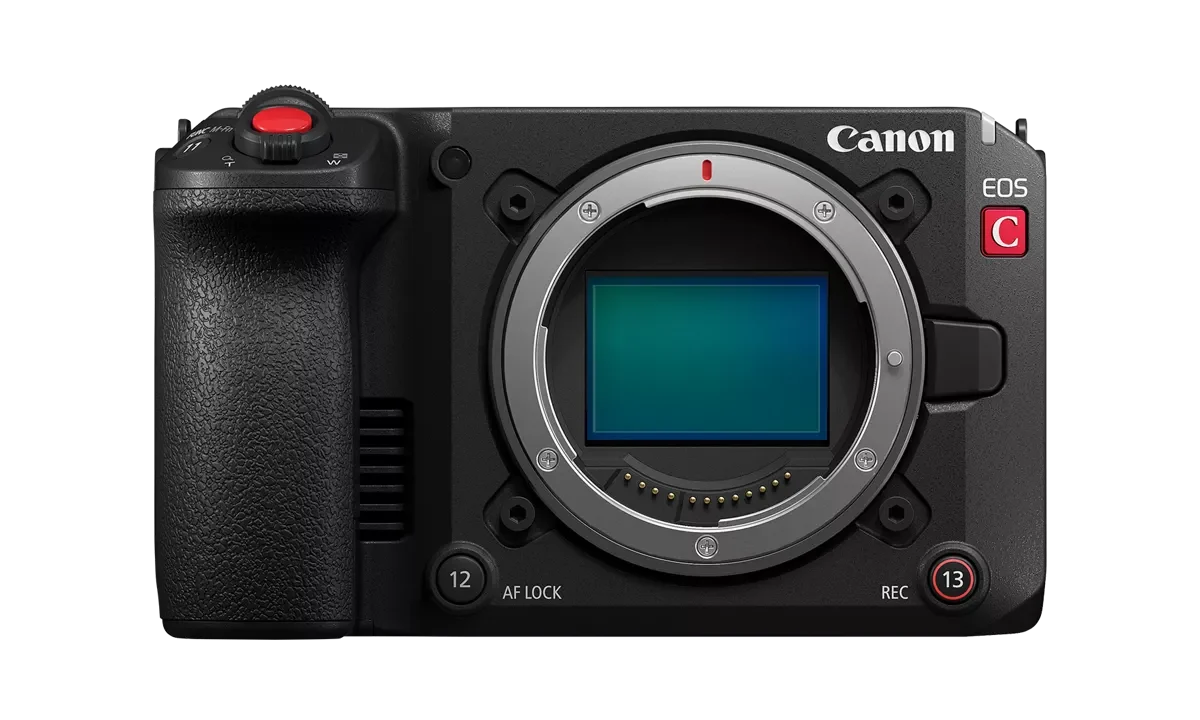
Canon EOS C50 is the most production-complete compact cinema body in this group. Nikon ZR is the compact R3D and 32-bit-float option. Panasonic S1II has outstanding measured latitude, while Sony a7 V offers a stronger measured image pipeline than FX2 at the cost of cinema-body ergonomics.
Comparing cameras for cinematic video means comparing modes, not bodies. CineD measured the Sony FX2 at 27.5ms full-frame readout and the a7 V at roughly 14ms — at 24fps, where each frame lasts 41.7ms, the first spends two-thirds of the frame interval reading out and the second about a third.
On this page
Cinematic specifications must be read as mode combinations. Resolution, crop, codec, bit depth, frame rate, dynamic-range mode and sensor readout all interact. A camera can have excellent latitude in a mode that is poor for fast motion, which is why cameras for cinematic video have to be compared mode by mode.
Production comparison
| Model | Internal recording | Production strengths | Measured caution |
|---|---|---|---|
| Canon EOS C50 | 7K60p Cinema RAW Light; 7K30p open gate | Active cooling, full-size HDMI, detachable XLR handle, Canon Log 2/3 | Official DR is manufacturer-rated until normalized lab evidence is used |
| Nikon ZR | 6K60p R3D NE; 4K120p crop | RED color workflow, internal/external 32-bit float audio, 4-inch screen | No electronic viewfinder; rig and media workflow are assignment-specific |
| Panasonic S1II | 5.8K ProRes RAW, open gate and 4K120p | IBIS, waveform tools, strong measured latitude | DR Boost can increase rolling shutter |
| Sony a7 V | 4K 10-bit 4:2:2; 4K120p crop | Good measured DR and latitude, IBIS, stills capability | No internal RAW |
| Sony FX2 | Oversampled 4K; 4K60p crop | Cooling, mounting points, tilting EVF, Sony cinema controls | CineD measured 27.5ms full-frame rolling shutter |
Lab results need context
CineD measured the a7 V at 12.4 stops at SNR 2 and about nine stops of latitude, with roughly 14ms rolling shutter. Its FX2 test found similar dynamic range but 27.5ms full-frame readout. Panasonic S1II reached ten usable latitude stops with room toward eleven in DR Boost ProRes RAW, while accepting slower readout. These results support mode-specific choices, not a universal image-quality crown.
Budget for the workflow
Add media, batteries, monitor, audio, timecode, storage and edit hardware. One hour of RAW can cost more in storage and backup labor than the camera-body difference. Download manufacturer sample files and test the post-production path before purchasing.
Rolling shutter, converted into frames
Readout time in milliseconds is abstract until you divide it by your frame interval. At 24 frames per second each frame occupies 41.7ms; at 25fps, 40ms; at 30fps, 33.3ms; at 60fps, 16.7ms.
Set the measured figures against that. A 14ms readout at 24fps occupies about a third of the frame interval, so the bottom of the image is recorded a third of a frame later than the top. A 27.5ms readout at the same frame rate occupies roughly two-thirds. And at 60fps, a 27.5ms readout is longer than the entire frame interval — which is why high frame rates on such sensors are usually cropped, since a smaller readout area is faster to scan.
What this produces on screen is skew: vertical lines lean during a pan, and fast lateral motion distorts. It is the single most consequential measurement when choosing among cameras for cinematic video, and it is also the one most absent from marketing material, because it has no flattering interpretation.
Practical rules that follow. Pan slower than you would on a global-shutter camera. Avoid whip pans on high-readout bodies. And if you shoot handheld with hard vertical elements in frame — architecture, doorframes, poles — test the specific mode before the shoot day.
Dynamic range is not exposure latitude
These two figures are routinely conflated and they measure different things, which is why the same camera can show a strong number for one and a modest number for the other.
Dynamic range is the span between the brightest and darkest values a sensor records usefully in a single exposure, measured on a static chart at a defined signal-to-noise threshold. CineD’s figure of 12.4 stops for the a7 V is quoted at SNR 2 — the threshold matters, because a looser threshold yields a larger number for identical hardware.
Exposure latitude is how far you can misexpose and still recover an acceptable image in the grade. CineD measured roughly nine stops of latitude on the same camera. That gap between 12.4 and nine is not a contradiction; it is the difference between what the sensor technically captures and what survives being pushed.
Latitude is the number that predicts your working experience, because real shoots involve imperfect exposure. When comparing cameras for cinematic video, look for latitude figures from a lab that publishes its method, and never compare one publication’s dynamic range against another’s latitude.
Storage math before camera choice
RAW acquisition costs more in storage and backup labor than most people budget, and the arithmetic is easy to do in advance. A recording bitrate of 1 gigabit per second is 125 megabytes per second, which is 450GB per hour. Under a three-copy backup discipline, that hour of footage occupies roughly 1.35TB across your drives.
| Bitrate | Per hour | Three copies |
|---|---|---|
| 200 Mbps | ~90GB | ~270GB |
| 500 Mbps | ~225GB | ~675GB |
| 1 Gbps | ~450GB | ~1.35TB |
| 2 Gbps | ~900GB | ~2.7TB |
Check your camera’s actual bitrate for the mode you intend to shoot, then multiply by the hours you expect per project and by three. Compare that figure against the price difference between the bodies on your shortlist — for a working videographer, the storage frequently costs more over a year than the camera choice does.
The mitigation is proxy workflows and selective RAW. Shoot RAW where latitude matters and a compressed intra-frame codec everywhere else, and edit from proxies rather than originals.
Audio, timecode and the boring I/O
Image quality gets the attention and connections cause the problems. Four checks before committing:
- Audio inputs. Whether XLR is available at all, whether it needs a handle unit, and whether phantom power is supplied. On-camera audio you can actually use saves a separate recorder and a sync step.
- Timecode. Genlock or timecode input turns multi-camera syncing from a chore into a non-event. Its absence is felt on every multi-camera edit.
- Full-size HDMI or SDI. Micro-HDMI connectors fail under repeated rigging; this is a reliability specification, not a convenience one.
- Active cooling. Determines whether long takes stop before you do. Bodies with fans record until the card fills; those without have thermal limits that vary with ambient temperature.
None of these appear in image-quality comparisons, and all of them decide whether a shoot day runs smoothly. Weigh them alongside the sensor when shortlisting cameras for cinematic video.
Sources and methodology
Official codecs and connections are paired with CineD’s standardized laboratory measurements. Manufacturer DR values are labeled and not mixed with CineD figures.
Source links
Join the discussion
Add useful context, ask a focused question or share relevant experience. Comments are moderated to protect readers from spam and promotional links.
Leave a thoughtful comment